

The lowest subscription price can become the most expensive choice if it leaves your team doing the same manual work. For UAE businesses comparing quotation software pricing UAE, the practical question is what each subscription helps you do, from calculating job costs to preparing customer-ready quotations.
Comparisons get difficult when billing terms and included features vary. Hand-built quotes can also lead to repeated data entry and inconsistent calculations. A useful workflow keeps labour, overhead, and profit in your estimate while giving customers a clear quotation.
This guide explains how to compare subscription terms with your actual quoting process, including billing frequency, user access, document options, and VAT presentation. Use the checklist and spreadsheet comparison to assess the work involved, not just the monthly or annual fee.
Key Takeaways
- Assess quotation software pricing UAE by comparing subscription terms with the quoting work the tool handles.
- Review billing frequency, user access, included features, usage limits, and how the listed price is presented.
- Compare spreadsheets and software by looking at manual steps, estimate consistency, document preparation, and access.
- Map your workflow, estimate inputs, customer quotation requirements, and document preferences before choosing a setup.
- BEQ connects estimates containing labour, overhead, and profit with customised, branded customer quotations.
Quotation Software Pricing in the UAE: What Are You Paying For?
Quotation software pricing is the subscription charge for tools that help a business prepare estimates and customer quotations. The fee may be billed monthly or annually, but the displayed amount is only one part of the decision. Compare the plan’s terms and functions with the tasks your team needs to complete.
Include the work around the subscription in your comparison. Staff time spent learning a tool, entering estimate details, or adjusting existing processes affects the practical cost of adopting it. These requirements vary by business, so don’t assume a subscription removes every manual task. In the UAE, check the currency and how any applicable tax is presented. For background on different ways organisations set prices, see this overview of common pricing strategies.
What does a quotation software subscription usually cover?
Start with the core process. Can the tool help you build an estimate, organise its inputs, and prepare a clear customer-facing quotation? Then review the plan information for account access, document options, and any stated usage limits. Treat these as comparison points, not features to assume. Accounting and invoicing may be included in a broader software package, but they are separate from the basic task of creating estimates and quotations.
BEQ lets businesses build estimates with labour, overhead, and profit, then turn those estimates into customised customer quotations that can be exported as PDFs. Compare the quoting process and subscription terms with the work your team needs to do.
Why does workflow fit matter as much as the subscription?
Break down a typical quote. A project-based business may need to calculate labour and materials, account for overhead and profit, and prepare a branded document. If staff repeat calculations or copy details between files, that work remains part of the process, even when the subscription fee is low.
A connected estimate-to-quote workflow can organise internal cost inputs and help your team prepare consistent customer quotations. Its value depends on how your team works. List the steps involved, identify which ones the tool supports, and note what work remains. This gives you a practical way to assess quotation software pricing UAE without assuming a particular saving or return.
How to Assess UAE Quotation Software Subscription Terms
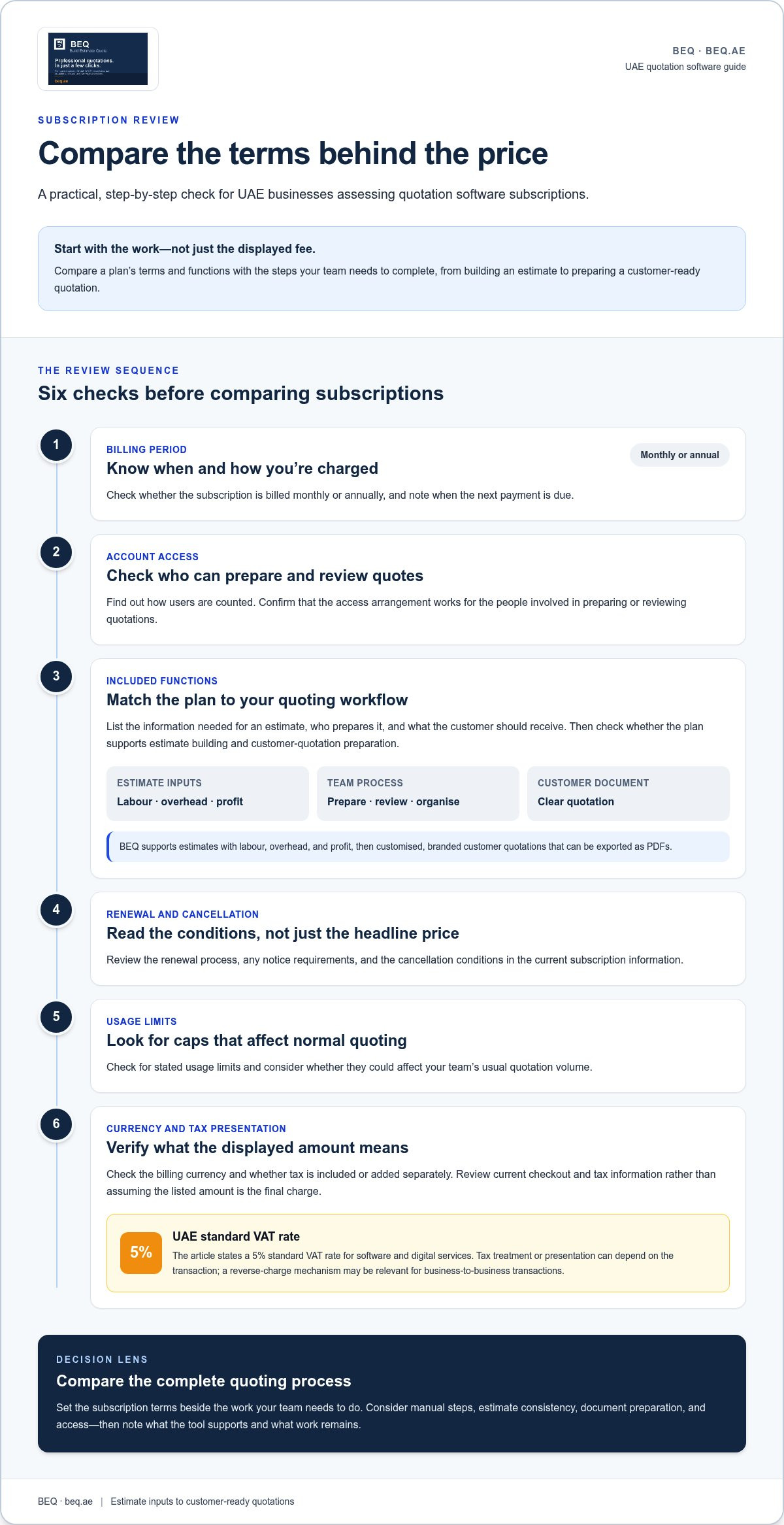
Start with the terms behind the displayed price. Review billing frequency, renewal and cancellation conditions, account access, and the estimate and quotation functions included. A low entry price may not be the best fit if the plan does not support the steps your team relies on.
Which subscription terms should UAE businesses compare?
Read the current subscription information and note the terms that affect your actual use:
- Billing period: Check whether charges are monthly or annual and when the next payment is due.
- Account access: Find out how users are counted and whether the access arrangement works for the people who prepare or review quotations.
- Included functions: Match the plan’s estimate-building and customer-quotation functions to your workflow.
- Renewal and cancellation: Review the renewal process, notice requirements, and cancellation conditions.
- Usage limits: Look for stated caps that could affect your team’s normal quoting volume.
Check the billing currency before comparing tools. If a subscription is presented to a UAE customer, confirm whether the amount is shown in AED and whether tax is included or added separately. The UAE’s standard VAT rate for software and digital services is 5%, but the tax treatment or presentation can depend on the transaction. Review current checkout and tax information rather than assuming the listed amount is the final charge. For business-to-business transactions, a reverse-charge mechanism may be relevant.
How can you compare features without paying for unused complexity?
Begin with the tasks your team handles now. List the information required for an estimate, who prepares or reviews it, and what the customer needs to receive. Compare plans against those steps instead of counting features. A broad accounting or invoicing suite may include functions beyond your immediate quotation needs, while a focused estimate-to-quote workflow may be more relevant than extras your team will not use.
BEQ supports estimates with labour, overhead, and profit, followed by customised, branded customer quotations that can be exported as PDFs. Compare that sequence with your process, then review the subscription terms alongside the tasks you need the tool to support. This keeps quotation software pricing UAE focused on practical fit rather than unused complexity.
See how the process works with BEQ’s estimate and quotation workflow.
Quotation Software Pricing vs Spreadsheets: Compare Real-World Value
A subscription is not automatically worthwhile. If you prepare quotes occasionally and your spreadsheet is accurate, clear, and easy to manage, it may already meet your needs. Compare the work involved in each approach rather than treating software as an automatic improvement.
Follow a typical job from costing to the finished quotation. Compare how each method handles the steps:
| Task | Spreadsheet | Quotation software |
|---|---|---|
| Manual steps | Enter or copy details between cost sheets and quotation documents. | A connected workflow can bring estimate building and quotation preparation together. |
| Estimate consistency | Standardise formulas and layouts, but edits may vary between files. | A repeatable process can help teams follow the same estimate structure. |
| Document preparation | Format the customer document separately, then check its figures and presentation. | Prepare a customer quotation through the tool and review its document options. |
| Access | Access depends on where the file is stored and how sharing is managed. | Cloud-based access lets users work through an account, subject to the tool’s terms. |
When can a spreadsheet remain a practical option?
A controlled spreadsheet can suit simple, occasional quotations with stable calculations and one standard document format. Assign an owner, maintain a master copy, and use a clear version-control routine for shared files. This helps prevent staff from editing outdated copies or using different formulas. A small business does not need dedicated quotation software by default.
When can quotation software make the process easier to manage?
Repeated quoting can involve recalculating costs, transferring details, and rebuilding the customer document for every job. A repeatable estimate-to-quote process brings those tasks into a consistent sequence. For example, construction or maintenance teams can include labour, overhead, and profit in an estimate before preparing the customer quotation.
BEQ supports that sequence: build estimates with labour, overhead, and profit, then create customised, branded quotations and export them as PDFs. A branded document gives the customer a consistent presentation, but does not guarantee a sales outcome. To assess quotation software pricing UAE, compare the steps in your current process with the workflow the tool supports. Note what changes, what work remains, and whether that difference matters to your team.
A UAE Buyer’s Checklist for Choosing Quotation Software Pricing
Before comparing plans, write down what your quoting process involves. Use this checklist to turn everyday tasks into requirements, then compare them with current subscription information. That makes quotation software pricing UAE easier to assess on practical fit, not headline price alone.
- Map your current process and users. Follow a quotation from the initial request to the customer-ready document. Note how often you prepare quotations, how complex a typical job is, and who creates, reviews, or sends each one.
- List the estimate inputs. Record the costs and details your team uses repeatedly, such as labour, overhead, and profit. Include project-specific items or calculations that should stay consistent between estimates.
- Define the customer-facing output. Note what a finished quotation needs to contain and how it should look. Include preferences such as business branding, PDF export, and account access for the people who prepare or review quotations.
- Compare subscription terms. Review the billing period, renewal and cancellation conditions, user access, included functions, and stated usage limits. Keep optional costs or business-specific setup work separate from the subscription charge.
- Verify currency and tax presentation. Check whether the amount is displayed in AED. Review checkout or tax information to understand how applicable VAT is presented. Do not assume tax is included or added separately without checking.
- Test a representative job. Take one typical job from estimate preparation through to the customer quotation. Check whether the process handles your required inputs and keeps internal cost details distinct from the customer-facing document.
- Match requirements with plan details. Compare each required task with the subscription information. Set aside functions your team will not use, and identify any essential requirement the plan does not cover. Decide based on the full terms, not the displayed price alone.
This comparison shows which steps matter, which subscription terms affect your decision, and what to review before choosing. See BEQ’s estimate and quotation workflow alongside your requirements.
Explore BEQ for UAE Estimate and Quotation Workflows
BEQ is a cloud-based platform for businesses that prepare estimates and customer quotations. It connects working out a job’s costs with preparing a document for the customer. Construction firms, fit-out contractors, MEP services, maintenance providers, suppliers, and other service-oriented businesses can use the platform for their quoting work.
How does BEQ support an estimate-to-quote process?
Build an estimate using labour, overhead, and profit as inputs, then turn it into a customised, branded customer quotation. Export the quotation as a PDF and access it through your BEQ account. This creates a clear path from estimate details to a customer-facing document instead of assembling the quotation as a separate file.
The same process can support different types of work. A fit-out team may prepare an estimate for a project, while a maintenance business may quote for a service job. A supplier can organise estimate details before creating a customer quotation. Each needs an estimate and a clear document to share, even when the work itself differs.
What is the next step for a UAE business comparing BEQ?
Use your documented requirements to assess the fit. Review the jobs your team quotes, the estimate inputs it needs, the customer document it must produce, and who needs account access. Compare those tasks with BEQ’s estimate-to-quote workflow and the subscription information. Check the displayed currency and tax presentation against current pricing information.
Focus on the process your team will use. Does it let you build estimates with labour, overhead, and profit, then prepare a branded customer quotation? Does PDF export suit how you share quotations? Do the subscription terms fit your planned use? These questions put quotation software pricing UAE in context and help you decide based on requirements rather than a headline figure.
Review BEQ’s pricing information and estimate-to-quote workflow against your checklist. Explore BEQ for estimate and quotation work.
Choose a Quoting Setup That Fits Your Work
Assess quotation software pricing UAE by looking beyond the subscription amount. Compare plan terms with the tasks your team needs to complete, and review billing currency, tax presentation, account access, and included functions before deciding.
Spreadsheets can remain practical for occasional, straightforward quotations. A dedicated workflow may suit a team that regularly builds estimates and prepares customer documents. The right choice depends on your process, not an assumed saving.
BEQ connects estimate building with customer quotation preparation. Add labour, overhead, and profit to estimates, then create customised quotations and export them as PDFs. Compare the workflow and subscription information with your documented needs.
Explore BEQ for your estimate and quotation workflow and see how it fits your quoting process.
Frequently Asked Questions
How much does quotation software cost in the UAE?
Quotation software costs depend on the provider’s plans, billing terms, and included functions. BEQ charges a subscription fee for access to its quotation-building software. Compare the current pricing information with the tasks you need the tool to handle, such as preparing estimates and customer quotations. Check the currency, billing period, and tax presentation before deciding.
What should quotation software pricing include?
Assess pricing against the work you expect the tool to support. Check whether the subscription covers estimate creation, customer quotation preparation, account access, and the document options your team needs. Review billing frequency, renewal and cancellation terms, and any stated usage limits. Separate the subscription charge from staff time or business-specific setup work.
Is quotation software worth paying for if my business already uses spreadsheets?
It may be worthwhile if repeated calculations, copying details, or preparing customer documents create extra work for your team. A spreadsheet may still suit occasional quotations with simple, stable calculations and clear file ownership. Compare both methods using a typical job: note the steps involved, how consistently estimates are prepared, and how the customer document is produced. Choose based on your actual workflow, not an assumed saving.
How do I compare quotation software subscriptions in the UAE?
Compare each subscription with the quotation tasks your team performs. Check billing frequency, renewal and cancellation terms, account access, included estimate and quotation functions, and stated usage limits. Confirm the displayed currency and how applicable tax is presented. Then test the workflow against a representative job, from estimate preparation to customer-ready quotation. This makes quotation software pricing UAE easier to compare on practical fit, not just the headline fee.
Can quotation software keep internal costs off customer quotations?
Quotation software can support a process that separates estimate inputs from the customer-facing document, but review the output before sharing it. BEQ lets users build estimates with labour, overhead, and profit, then prepare customised customer quotations. Check that the quotation presents the intended customer pricing and does not expose internal cost details you want to keep private.
Does quotation software pricing usually include branded PDF quotations?
Branding and PDF export can vary by provider and subscription. BEQ supports customised, branded customer quotations and PDF export. Compare the subscription information with the document features your team needs. Consider whether the quotation presents your business clearly and whether the format suits how you share documents with customers.
What should UAE businesses check about currency and VAT when reviewing software pricing?
Check whether the subscription is displayed in UAE dirhams (AED) and whether the quoted amount includes VAT or adds it separately. The standard UAE VAT rate for software and digital services is 5%, though the tax treatment can depend on the transaction. Review current checkout or tax information to understand how the amount applies before comparing subscription costs.