

When you compare estimate software UAE options, start with the work your business prices. The software should help you organize job inputs, review the figures, then prepare a clear quotation for the customer. If estimates take too long or vary from one job to the next, improve the process behind the number, not just the document it produces.
Service work has moving parts. Labour, overhead and profit all affect an estimate, but the customer-facing quotation has a different job: explain the proposed work and price clearly. Keep the working figures organized, then decide which details belong in the offer.
This guide explains how to assess software against your estimating tasks, cost structure and quotation needs. It covers practical considerations for construction, fit-out, MEP, maintenance, supply and other service work in the UAE.
Build-Estimate-Quote (BEQ) supports this process. Add labour, overhead and profit to estimates, turn them into branded customer quotations, and export the quotations as PDFs for access through a BEQ account.
Key Takeaways
- Assess estimate software UAE by matching it to the jobs you price, the inputs you track and the quotations customers receive.
- Keep the working estimate distinct from the customer-facing offer so each document serves its purpose.
- Review labour, overhead and profit as part of your estimating process before preparing a quotation.
- Compare the inputs required for project work, recurring maintenance and supplier jobs.
- Use a consistent route from job details to a polished quotation, including branded PDF output.
What estimate software helps UAE businesses manage
Estimate software helps a business organize job details and costs, then prepare a working estimate. It gives teams a structured way to review what a job involves before presenting a price to a customer. When comparing estimate software UAE options, begin with the work behind each estimate rather than a long list of features.
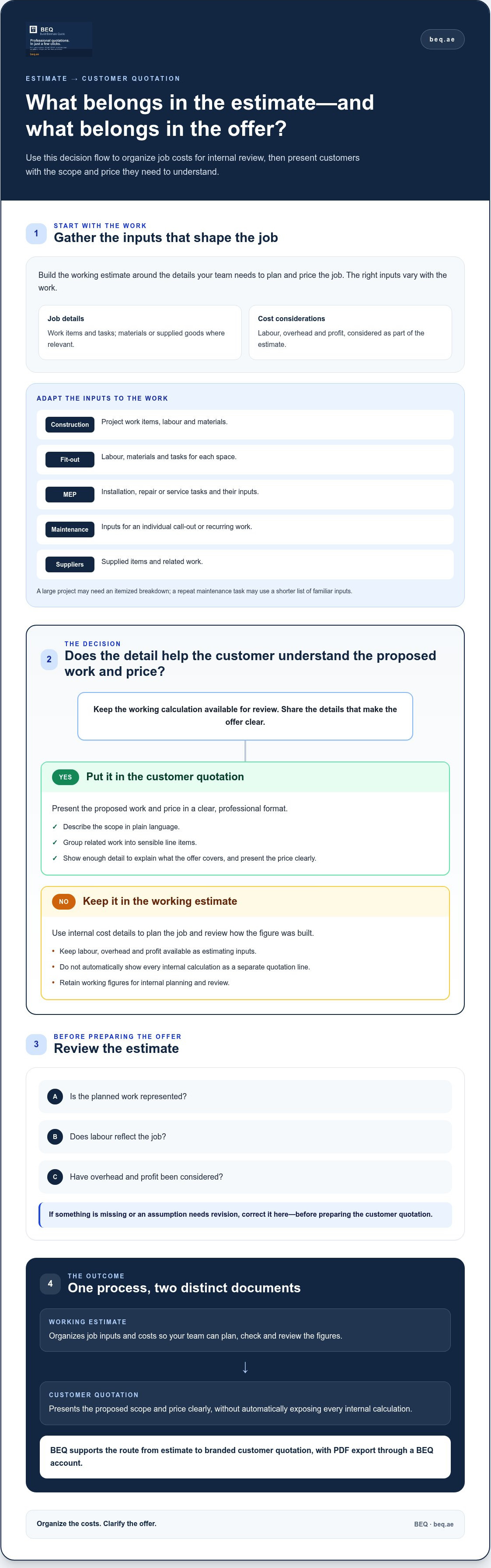
An estimate is the working calculation: the tasks, resources and costs your business uses to plan a job. A quotation is the customer-facing offer prepared from that calculation. Keeping these purposes distinct helps staff review how a figure was built while giving customers a document focused on the proposed work and price.
What does estimate software do in a business?
Estimate software brings job inputs together so your team can build and review an estimate in an orderly way. Depending on the work, those inputs may include work items, labour, materials or supplied goods, overhead and profit. A structured estimate makes it easier to see what has been included, identify omissions and adjust figures before preparing a quotation.
A consistent format can also help with repeat work. If your business prices similar jobs often, an organized estimate gives staff a useful structure to follow and review. The inputs still need to reflect the current job. The overview of estimating software explains how tools can support the process of working through and pricing job requirements.
The practical benefit is a clearer route from job information to a customer document. Your team can organize working cost details, then prepare a quotation that presents the relevant offer without listing every internal calculation by default.
Which UAE businesses can use estimate software?
Estimate software can support different kinds of service and supply work. The right inputs depend on how your business scopes and prices each job:
- Construction firms: organize project work items, labour and materials.
- Fit-out contractors: bring together labour, materials and tasks for each space.
- MEP services: structure estimates around installation, repair or service tasks and their inputs.
- Maintenance providers: prepare estimates for individual call-outs or recurring work.
- Suppliers: organize supplied items and related work before preparing a customer quotation.
A large project may need an itemized breakdown, while a repeat maintenance task may use a shorter list of familiar inputs. Start with how your business scopes and prices its work. Choose a process that fits those jobs instead of forcing every service into the same format.
How UAE estimate software should separate job estimates from customer quotes
A useful estimate-to-quote process keeps internal cost planning distinct from the offer a customer receives. The estimate helps your team work through the job and review the figures. The quotation presents the proposed scope and price in a clear, professional format.
An estimate is the working calculation; a quote is the customer-facing offer based on it.
Customers need to understand what the work includes and what it will cost, but they may not need to see how your business arrived at every figure. Labour, overhead and profit can inform your price without appearing as separate quotation lines. Include details that clarify the scope, and keep working calculations available for internal planning and review.
What belongs in the working estimate?
Build the estimate around the inputs that shape the job. BEQ lets businesses add labour, overhead and profit before preparing a customer document. The exact inputs depend on the work: a project with several work items may need more detail than a short maintenance task. Use a structure that makes the relevant figures easy to review without forcing different jobs into one calculation format.
Before preparing a quotation, check that the planned work is represented, labour reflects the job, and overhead and profit have been considered. This is the point to correct omissions or revise assumptions. A clear working estimate also gives your team a useful reference when reviewing how similar jobs have been priced.
What should the customer see in the quotation?
Make the offer easy to understand. Describe the scope in plain language, group related work into sensible line items and present the price clearly. Include enough detail for the customer to see what the offer covers, without automatically showing every internal calculation. Clear presentation can help prevent confusion about the proposed work.
Estimate software UAE businesses use for both steps should make the move from reviewing costs to preparing a customer document straightforward. BEQ turns estimates into polished quotations that can be customized with business branding and exported as PDFs. The working estimate and finished quotation have distinct purposes: one supports internal review, while the other presents the offer to the customer.
See how BEQ connects estimates with customer quotations to bring the working calculation and customer-ready offer into one process.
How to assess estimate software for UAE service work
Assess estimate software UAE options against the jobs your team prices and the documents it needs to produce. Start with examples of your actual work instead of a generic feature checklist. A useful process should make familiar estimates easier to prepare, review and turn into customer quotations.
- List the work you estimate. Note common job types, work items and repeat estimate structures. A construction project may need a detailed breakdown, while a maintenance visit may use a simpler service-based price. Fit-out, MEP and supply jobs each have different inputs.
- Check the cost inputs. Identify the figures your business uses, including labour, overhead and profit. BEQ supports these inputs. Try a representative job and see whether the figures are easy to organize without forcing every type of work into one formula.
- Trace the route to the quotation. Check how the working estimate leads to a customer-facing document. The quotation should explain the scope and present the price clearly, without automatically exposing internal calculations.
- Review the finished output. Consider whether branded quotations, PDF export and access through an account suit the way your team prepares and shares documents. Review a typical quotation for readability and clarity.
- Check UAE presentation needs. Decide how prices should appear for your business and customers, including whether quotations need to show amounts in AED. If you include VAT wording or calculations, verify the applicable guidance with an official UAE source before setting your document format.
Match the software to the jobs you estimate
Use representative examples: a construction job with several work items, a fit-out estimate involving labour and materials, an MEP service task, a maintenance visit and a supplier quotation. Compare the level of detail each requires and how often its structure repeats. This helps you decide whether your team needs itemized project estimates, a simpler service price or both.
Check the estimate-to-quote output
Follow an estimate from its initial inputs through to the customer document. Check that your team can review the cost details and prepare a quotation with a clear scope and business branding. Open the exported PDF and assess its readability. Also consider whether accessing documents through an account fits the way your team works.
Explore BEQ estimate and quotation workflows to see how estimates can become branded customer quotations and PDF documents.
Which estimate software needs matter across UAE service industries?
The right estimate structure depends on what your business sells and how it prices the work. A contractor may need to account for several tasks across a project. A maintenance provider may estimate a familiar service, while a supplier may quote defined goods or packages. Use the comparison below to identify what your team needs to organize before preparing a customer quotation.
| Business type | Typical estimate inputs | Useful quotation output |
|---|---|---|
| Construction | Project work items, labour and related job inputs | Itemized scope with a clear project price |
| Fit-out | Work by area or task, labour and materials | Grouped items that show the proposed work |
| MEP services | Installation, repair or service tasks and labour | Scope organized by service or work item |
| Maintenance | Call-out tasks, recurring work and labour | A concise offer for the service being quoted |
| Suppliers | Goods, quantities and any related work | A clear list of supplied items or defined packages |
Estimate software for contractors and project work
Construction, fit-out and MEP estimates may include several work items, each with its own labour and other job inputs. A repeatable structure helps teams review similar projects consistently and prepare quotations with a comparable level of detail. Keep the format consistent, but adapt the scope and inputs to each project.
When assessing estimate software UAE options for project work, try a real job with multiple items. Can your team organize the work, review the estimate and carry the relevant scope into a customer quotation? This practical test is more useful than relying on a long list of general features.
Estimate software for maintenance and suppliers
Recurring maintenance work may use familiar service tasks, adjusted for the specific visit or job. A supplier quotation may focus instead on goods, quantities or a defined package. Each job needs enough working detail to support the price, but not every estimate needs the same depth.
Keep the customer document consistent in presentation while adjusting its detail to the offer. A maintenance customer needs a clear description of the service; a supplier’s customer needs to understand which items or package the price covers. BEQ supports estimates that become branded customer quotations and can be exported as PDFs. Explore BEQ estimate and quotation workflows to organize project and service-based quoting in one process.
Put a UAE estimate-to-quote process in place with BEQ
Once you know what your jobs require and what customers need to see, map the steps into a practical workflow. BEQ is cloud-based estimate and quotation software for service-oriented businesses. It supports the process from organizing job inputs to preparing a polished customer quotation.
A straightforward estimating workflow with BEQ
Start with the work to be priced. Add labour, overhead and profit to build a business estimate, and keep the figures organized for review. The inputs should reflect the job, whether it involves several project tasks, a maintenance service or supplied work.
Next, turn the estimate into a customer quotation. Customize the presentation with your business branding, and focus the document on the proposed work and price. This keeps the working estimate and customer quotation focused on their separate purposes.
Export the quotation as a PDF for a ready-to-share document. Quotations can also be accessed through a BEQ account. These steps create a clear route from job details to customer-facing output, keeping the estimating and quoting process focused on the job.
Decide whether BEQ fits your quotation work
BEQ supports construction firms, fit-out contractors, MEP services, maintenance providers, suppliers and other service-oriented businesses. To assess the fit, consider the jobs your team prices, the labour, overhead and profit inputs it needs to organize, and the kind of branded quotation you want to provide.
Test the process against a representative job. Can your team build an estimate from the relevant inputs, prepare a clear quotation and export it as a PDF? Does account access suit the way your business works with documents? These checks keep the decision focused on the estimating and quoting tasks at hand.
Build estimates and customer quotations with BEQ and bring your job inputs and customer-ready documents into one workflow.
Bring your estimating and quoting into one clear workflow
Choose estimate software UAE businesses can use to organize the figures behind each job and prepare clear, consistent customer quotations. Match the process to your work, then keep internal estimate inputs distinct from the scope and price shown to customers.
BEQ supports adding labour, overhead and profit to business estimates, then turning them into branded quotations that can be exported as PDFs. Its cloud-based platform serves construction, fit-out, MEP, maintenance, supplier and other service-oriented businesses. Check whether your team can move from job details to a polished customer document in a way that fits how you price work.
Build clearer estimates and customer quotations with BEQ and put an organized process in place for your next job. Start with the work you already quote, and make each step easier to review and present.
Frequently Asked Questions
What is estimate software?
Estimate software helps a business organize job details and prepare a working cost estimate. It can bring work items and inputs such as labour, overhead and profit together for review before a customer quotation is prepared. For example, a contractor can list the tasks involved in a project, review the estimate and then present the proposed scope and price to a customer.
Is estimate software different from quotation software?
Estimate software focuses on preparing and reviewing the working calculation, while quotation software focuses on presenting an offer to a customer. Some platforms connect both steps. Keeping their purposes clear helps a business review internal job inputs without automatically showing every calculation as a separate customer line. The quotation should explain the proposed work and price in a format the customer can understand.
Can estimate software include labour, overhead and profit?
Yes. Estimate software can support these inputs, depending on the platform. BEQ lets businesses add labour, overhead and profit to an estimate before turning it into a customer quotation. Use inputs that reflect how your business prices its work. The right cost structure can differ between a multi-item project, recurring maintenance and supplied goods.
How do I choose estimate software for a UAE business?
Compare estimate software UAE options against real jobs your team prices. List common work types and inputs, then check how each tool supports labour, overhead and profit and whether it produces a clear customer quotation. Review branding, PDF output and account access against your team’s needs. Consider how amounts and any VAT wording should appear, and verify VAT guidance with an official UAE source.
Can estimate software turn an estimate into a customer quotation?
Some estimate platforms connect the working calculation to a customer-facing quotation. BEQ supports this process: businesses can build estimates with labour, overhead and profit, then turn them into polished quotations customized with branding. Quotations can be exported as PDFs and accessed through a BEQ account. Review the finished document to ensure the scope and price are clear to the customer.
Is estimate software useful for contractors and maintenance businesses?
Yes. Contractors can organize estimates for project work with multiple tasks and labour inputs, while maintenance providers can prepare estimates for individual or recurring service work. The structure and level of detail can differ by job. BEQ supports construction, fit-out, MEP, maintenance, supplier and other service-oriented businesses with a workflow from business estimate to branded customer quotation.
Does estimate software handle VAT in the UAE?
VAT features vary by software, so don’t assume an estimate or quotation tool calculates or reports VAT. Check current requirements and wording against official UAE tax guidance before using them in customer documents. BEQ supports business estimates and customer quotations. Keep tax decisions separate from your estimate-to-quote workflow.
