
The most polished quote isn’t necessarily the best tool for pricing a job. Business estimate and quote software should help you calculate labour, overhead, and profit consistently, then present a clear customer price without exposing your internal costing.
If you price construction, fit-out, MEP, maintenance, or other project-based work, general-purpose quote tools may not match the way you build a job price. You need accurate estimates and professional quotations, without extra admin or awkward workarounds.
Compare software by how it handles job-cost calculations, customer-ready quotes, and the step between them. Check the cost inputs, branded documents, PDF exports, and access to saved work against the jobs your business actually prices. BEQ follows this estimate-to-quote flow, helping you build estimates with labour, overhead, and profit before turning them into branded customer quotations.
Key Takeaways
- Compare business estimate and quote software by costing depth, quote preparation, branding, PDF output, and access to saved work.
- Keep internal cost inputs and pricing decisions separate from the description and total customers see.
- Use a recent job to map the costs you need to calculate and the quotation you need to deliver.
- Test a representative estimate in each shortlisted workflow to spot gaps before choosing a tool.
- BEQ lets you build an estimate with labour, overhead, and profit, then prepare a branded quotation for PDF export.
What business estimate and quote software does for a working business
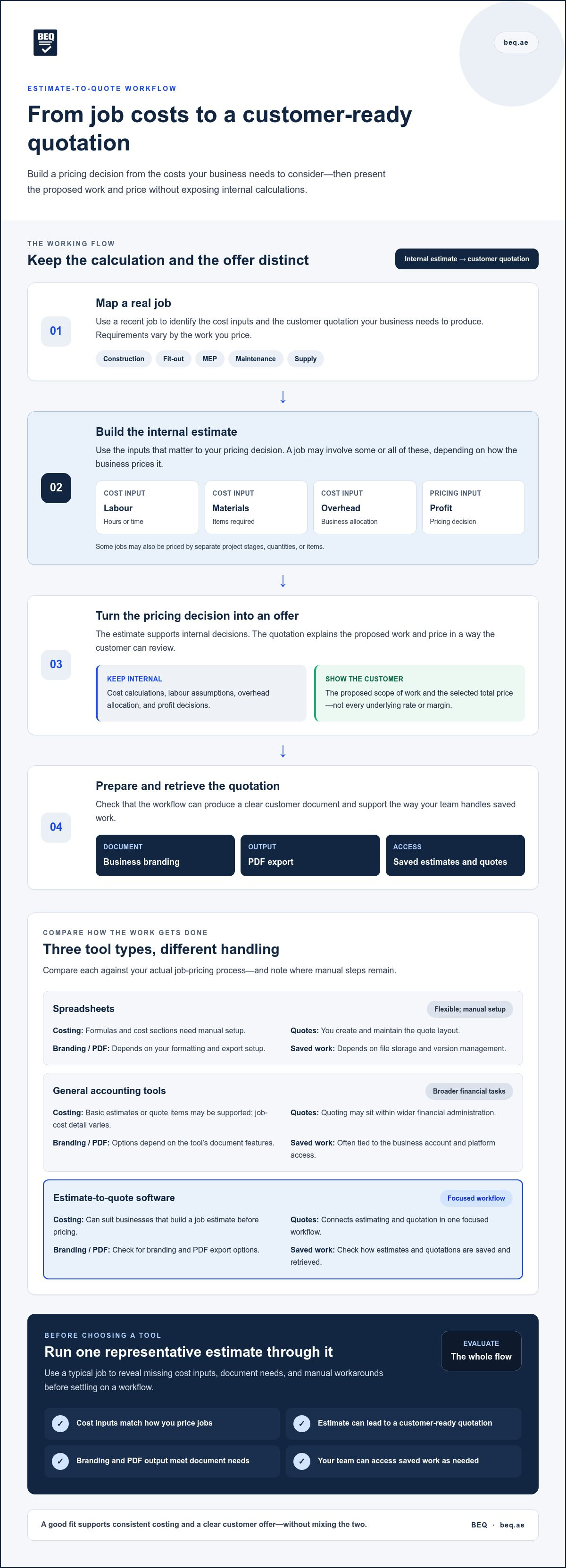
Business estimate and quote software helps a company prepare job estimates, then turn its pricing decision into a customer quotation. The estimate is the working calculation. The quotation is the clear offer that describes the proposed work and price for a customer to review. If accepted, it gives both sides a shared reference for the agreed work.
Estimate-to-quote software connects internal job pricing with a clear customer offer while keeping the two documents distinct. A cost estimate helps a business consider the resources and expected costs involved in planned work. Those figures inform the price without requiring the business to show every calculation to the customer.
How an estimate differs from a customer quotation
An estimate supports internal decisions. Depending on how the business prices the job, it may account for labour hours, materials, overhead, profit, or separate project stages. A quotation presents the chosen scope and price in a format the customer can understand. It doesn’t need to display the business’s underlying rates or margin.
For example, a maintenance business might estimate technician time, replacement materials, and overhead internally. Its quotation could instead list the inspection, replacement part, and repair work, followed by the total price. The estimate helps set the price; the quotation explains the offer.
Which businesses may need estimate and quote software?
This software can suit construction firms, fit-out contractors, MEP services, maintenance providers, suppliers, and other service businesses. Their jobs use different cost inputs and pricing methods. A fit-out project could be priced by stages, while a service visit might centre on labour and materials. A supplier may focus on quantities and items.
Choose a process that reflects the work you price. You may need to account for labour, materials, overhead, or project stages, but not every job will use each input. The practical value is having a place to build an estimate and prepare a customer quotation from the resulting pricing decision, without mixing internal calculations with the offer.
Compare estimate and quote software by the work it handles
Compare the workflow, not just the feature list. Spreadsheets, broad accounting platforms, and dedicated estimate-to-quote software can all play a role, but they handle job pricing and customer documents differently. The right fit depends on your cost structure, the quotations you send, and how much manual handling your team can manage.
Spreadsheets, accounting tools, and dedicated quotation software
Spreadsheets are flexible, but you need to build and maintain the formulas, layouts, and file versions yourself. General accounting tools may place quotes alongside wider financial administration. A focused estimating workflow is built around creating a job price before preparing a customer quotation. Compare each option against your actual process and note where manual steps remain.
| Option | Costing depth | Quote preparation | Branding and PDF | Access to saved work |
|---|---|---|---|---|
| Spreadsheets | Flexible, but formulas and cost sections need manual setup. | Requires you to create and maintain a quote layout. | Can be formatted or exported, depending on your setup. | Depends on where files are stored and how versions are managed. |
| General accounting tools | May support basic estimates or quote items; job-cost detail varies. | Quotes may sit within broader financial tasks. | Options depend on the tool and its document features. | Often tied to the business account and platform access. |
| Estimate-to-quote software | Can suit businesses that need to build a job estimate before pricing. | Connects estimating and quotation steps in a focused workflow. | Check for branding and PDF export options. | Check how estimates and quotes are saved and retrieved. |
A comparison checklist for business buyers
Start with the needs of a typical job. Treat these as core requirements if your pricing depends on them:
- Cost inputs: Can you account for labour, overhead, and profit in the estimate?
- Quote workflow: Can you prepare a customer-ready quotation from the pricing work?
- Customer document: Can you apply business branding and export the quotation as a PDF?
- Saved work: Can your team access estimates and quotations through its account?
Treat extra features as conveniences unless they solve a real workflow problem. No category suits every business. To see how a focused workflow handles estimating and quotations, explore BEQ, a business estimate and quote software option.
Keep internal job costs separate from customer-facing quotes
A professional quotation doesn’t need to reveal every calculation behind the price. Use the estimate for internal decisions, then present customers with the work offered and the price they’re being asked to accept. This distinction matters when labour assumptions, overhead allocation, or profit inform your pricing but aren’t part of the customer’s scope.
Internal costing and customer quote content serve different audiences. The estimate helps your business assess the job and decide what to charge. The quotation explains the proposed work and price. Business estimate and quote software should support this transition without turning an internal cost breakdown into the customer document.
What to keep in internal estimate calculations
Record the inputs that matter to your pricing process. These may include expected labour hours, overhead allocation, materials, and profit. The right inputs depend on the work and how your business sets prices. There’s no single margin method or formula for every project, so document your method clearly and apply it consistently across your team.
For example, a service business might estimate technician time and overhead before setting a price for a scheduled repair. Those assumptions can guide the offer without appearing as separate customer-facing charges.
What a customer-facing quote should communicate
Make the offer easy to review. Describe the scope in plain terms, group work into relevant line items, and show the price being offered. A branded, readable PDF gives the quotation a clear layout that customers can refer back to.
For a repair job, the customer-facing structure might look like this:
- Scope: Repair the identified equipment issue.
- Line item: Inspection and repair work.
- Line item: Replacement parts, if included in the offer.
- Price: The total for the described work.
This presents the offer without listing internal labour assumptions, overhead allocation, or profit. Keep the scope accurate and the price clear, but don’t assume every field in an internal estimate belongs in the exported quotation. The estimate-to-quote process should help you prepare a customer document for its intended audience. BEQ supports building estimates with labour, overhead, and profit, then preparing branded customer quotations for PDF export.
Assess software fit for your estimating and quoting process
Compare tools against a real job, not a hypothetical feature list. A recent project or service estimate gives you a practical way to assess whether business estimate and quote software fits your team’s work, from the first cost calculation to the customer-ready quotation.
Map one real job before comparing tools
Choose a completed job with typical pricing needs. Note the labour, overhead, and profit considerations, along with any materials or project stages that affect the price. Then write down the steps your team took to prepare the customer quotation.
Look for repeated data entry, manual formatting, confusing handoffs, and internal details that should stay out of the customer document. Use the same job to assess each workflow. This keeps your comparison grounded in day-to-day work.
Score the workflow against practical requirements
Mark each item as Essential or Useful for your business. Then record what each tool actually provides. Assess the whole workflow, from entering cost inputs to producing and accessing the customer quotation.
| Requirement | Priority | What to assess |
|---|---|---|
| Costing | Essential / Useful | Can the estimate account for the inputs your job needs, such as labour, overhead, and profit? |
| Quote clarity | Essential / Useful | Can you present the scope, relevant line items, and price in a clear customer document? |
| Branding | Essential / Useful | Can the quotation carry your business branding? |
| PDF export | Essential / Useful | Can you export the quotation as a PDF for sharing or record keeping? |
| Account access | Essential / Useful | Can you access saved estimates and quotations through the business account? |
Prioritise requirements that affect every job. A feature that saves occasional formatting effort may be useful; a missing costing step can disrupt the core process. Compare the completed test, note any workarounds, and weigh them against what matters most to your team.
To see how BEQ handles the estimate-to-quotation workflow, see how BEQ handles estimates and quotes.
Use BEQ to move from business estimate to polished quote
Once you’ve mapped your pricing steps, compare them with a tool built to carry work from estimate to customer quotation. BEQ is a cloud-based platform for businesses that need to price jobs before presenting a clear offer. Build an estimate, account for labour, overhead, and profit, then prepare a polished quotation.
How BEQ supports estimate-to-quote work
Use the estimate to organise the inputs behind your job price. Labour, overhead, and profit can be included in the calculation, giving your team a working basis for deciding what to charge. The customer quotation presents the offer in a polished, branded format rather than exposing every internal calculation.
Customise quotations with your business branding and export them as PDFs. They’re accessible from your BEQ account, and cloud-based access lets you reach them anytime. Compare this workflow with your own checklist: Does the estimate support your cost inputs? Can you prepare the customer document you need? Can your team access saved work through its account?
What to do before choosing your next tool
Base the decision on a typical job. Write down what your team needs to price it, which details belong in the customer offer, and what format you need to share. Then compare that workflow with the features and output described in this article. Look for a clear fit between your cost inputs and the quotation you want to issue, rather than choosing features you won’t use.
For project and service businesses, the distinction matters. A construction, fit-out, maintenance, or supply job may call for different estimate details, but the selection test is practical: can you build the job price, present the work clearly, apply your branding, export the quotation, and return to saved work through your account?
Review BEQ’s product information against those needs and decide whether the workflow suits your business. Explore BEQ for your estimate-to-quote workflow.
Put your estimate-to-quote process in order
The right business estimate and quote software should fit the way you price real work. Compare tools against a recent job, confirm that essential cost inputs are supported, and make sure the customer quotation shows a clear scope and price without exposing internal calculations.
BEQ brings those steps together. Build estimates with labour, overhead, and profit, then prepare branded quotations that can be exported as PDFs and accessed from your BEQ account. Keep the selection focused on the work your business needs to handle, from pricing the job to sharing the offer.
Ready to put that workflow into practice? Explore BEQ for your estimate-to-quote workflow. Start with the jobs your team prices most often and choose a process that keeps the work clear from estimate to quotation.
Frequently Asked Questions
What is business estimate and quote software?
Business estimate and quote software helps businesses prepare job estimates and turn pricing decisions into customer quotations. An estimate can organise the expected inputs for work, such as labour, overhead, and profit. The quotation presents the proposed work and price to a customer. BEQ is a cloud-based platform that supports this process, with estimates and quotations accessible through a BEQ account.
How is an estimate different from a business quotation?
An estimate is a working calculation that helps a business decide how to price a job. It may include internal assumptions about labour, overhead, materials, or profit. A business quotation is the offer shown to a prospective customer. It should explain the proposed work and price clearly without displaying every internal calculation used to set that price.
Can estimate software keep internal costs off customer quotes?
Yes. Estimate software can keep internal cost calculations separate from the customer-facing quotation. The estimate informs the price, while the quote focuses on the scope, relevant work descriptions, and total offered. With BEQ, businesses can build estimates that account for labour, overhead, and profit, then prepare polished customer quotations. Review the exported document to ensure it contains the information intended for the customer.
What should businesses compare when choosing quotation software?
Compare the tool against the steps your team follows to price and present a real job. Check whether it supports the cost inputs you use, prepares a clear customer quotation, allows business branding, exports PDFs, and gives access to saved work through an account. Mark each requirement as essential or useful. Test a representative project or service estimate to spot gaps and manual workarounds.
Can quotation software include labour, overhead, and profit in estimates?
Some estimate-to-quote platforms support labour, overhead, and profit as inputs to the estimate. BEQ supports estimates that account for these elements before the business prepares a customer quotation. The figures inform the pricing decision; they don’t have to appear as separate fields in the customer document. Choose inputs that match your work and pricing method, rather than assuming every job uses the same formula.
Can I create branded business quotations as PDFs?
Yes. BEQ lets businesses customise customer quotations with their branding and export them as PDFs. A well-presented PDF can make the proposed scope and price easier for a customer to review and keep for reference. Before sharing a quotation, check that the work description and total are clear and that the document shows the details intended for the customer, not internal costing assumptions.
Is estimate and quote software suitable for construction and service businesses?
It can suit businesses that price work before preparing customer quotations, including construction firms, fit-out contractors, MEP services, maintenance providers, suppliers, and other service businesses. Their estimates may use different inputs or divide work into different stages. BEQ supports creating estimates with labour, overhead, and profit, then preparing branded quotations. Compare the workflow with the jobs your business prices most often.

