

A detailed estimate isn’t a customer-ready quote. To build estimates into quotes, keep the working calculations intact, then present the customer with the price, scope, and terms they need to review. Copying figures by hand can omit a task or create inconsistent amounts. A clear process keeps those details aligned.
If internal costs and customer-facing line items blur together, a quote becomes harder to check and approve. Separate the estimate from its presentation. Confirm the work, clarify assumptions and exclusions, and arrange the final figures so the customer can see what’s included without sorting through your calculations.
This guide covers each step, from checking the estimate and defining scope to shaping and reviewing the finished quote. You’ll learn how to keep costs under control, carry important details forward, and create a consistent document. BEQ brings estimates, including labour, overhead, and profit, into customised, branded quotations that you can export as PDFs.
Key Takeaways
- Keep the estimate as your working calculation and make the quote a clear offer for a defined scope and price.
- Before you build estimates into quotes, check the request, work scope, resources, calculations, and assumptions.
- Turn raw cost details into customer-friendly deliverables, and label allowances or uncertain items clearly.
- Use a pre-send checklist to catch missing work, duplicated items, mismatched totals, and unclear exclusions.
- Build a repeatable process with BEQ by preparing estimates with labour, overhead, and profit, then creating customised customer quotations.
Build Estimates into Quotes by Separating the Two Documents
An estimate is an internal calculation of the work, resources, and expected cost for a job. A quote is the customer-facing offer that sets out the scope and price. Keep the documents connected, but give each a different purpose. The estimate helps you plan and check the numbers. The quote helps the customer understand what you’ll provide and what it will cost.
This distinction makes it easier to build estimates into quotes without turning the customer document into a cost worksheet. Include enough detail to explain the offer, but don’t automatically show every internal calculation or margin. For background on how estimates organise expected costs, see Understanding Cost Estimates.
What belongs in an estimate before you prepare a quote?
Use the estimate to work through the job before presenting a price. Depending on the project and your business practices, its inputs may include:
- Work: Tasks and stages needed to complete the job.
- Materials: Items and quantities expected to be used.
- Labour: The time and effort required for each task.
- Overhead and planned profit: Amounts included when calculating the price.
The right level of detail depends on the job. A small, familiar task may need fewer lines than a project with several stages or dependencies. In either case, keep assumptions and uncertain quantities visible during internal review. Mark what’s confirmed, what’s an allowance, and what may change if the scope changes. This makes the figures easier to check before they shape the customer offer.
What changes when an estimate becomes a customer quote?
Translate the calculation into a clear description of the work and its price. Carry forward the relevant deliverables and quantities, along with timing, assumptions, and exclusions that affect the customer’s understanding. Group related tasks when that improves readability, but don’t make the scope so broad that the customer can’t tell what’s included.
For example, internal lines might break down labour hours, material quantities, overhead, and profit. A quote can present these calculations as a defined service or project deliverable with a clear price. The customer sees the offer, not every step used to calculate it.
Keep the estimate available for your own checks, then review the quote for clear scope and consistent figures. A well-prepared quote gives the customer enough information to assess the offer without exposing the workings behind every amount.
Prepare the Estimate Before Building the Customer Quote
Before you build estimates into quotes, make sure the estimate reflects the whole job. A clear calculation gives you a sound basis for the customer-facing scope and price. A complete estimate reduces the chance of leaving work out of the quote.
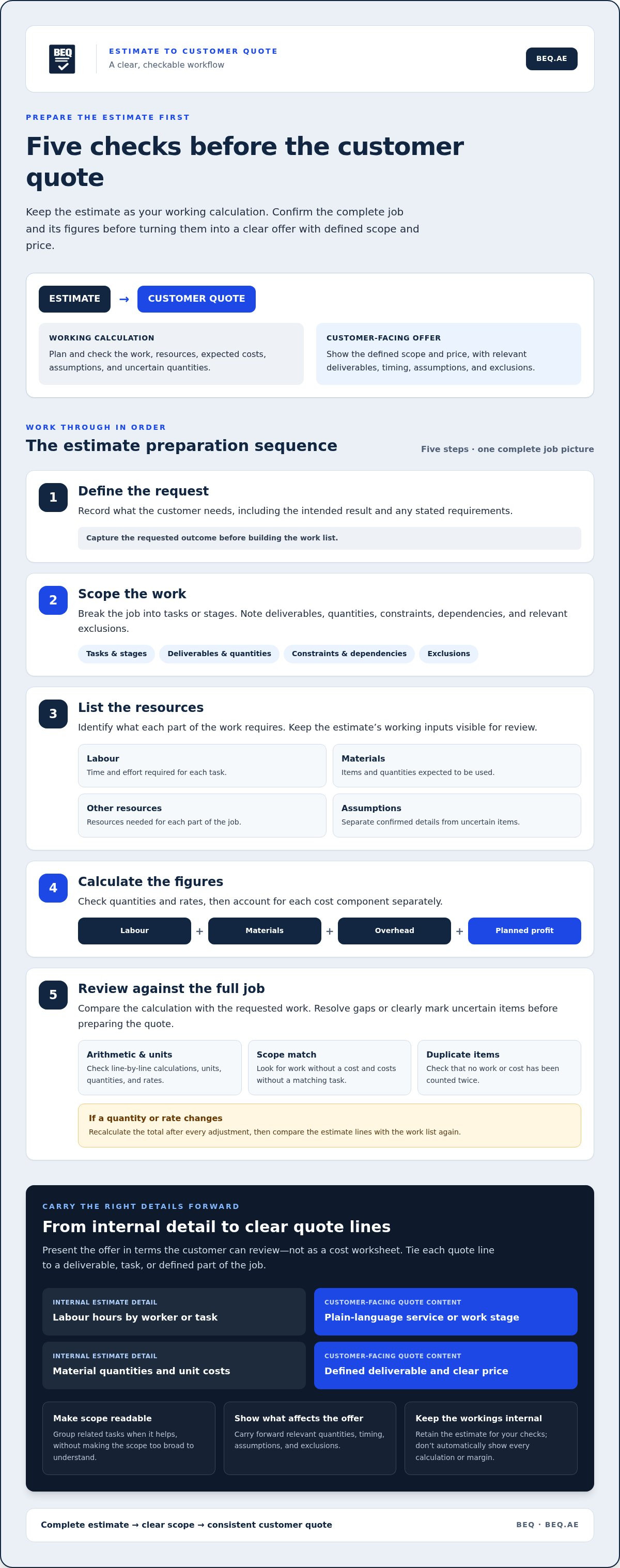
Work through these steps in order:
- Define the request. Record what the customer needs, including the intended result and any stated requirements.
- Scope the work. Break the job into tasks or stages. Note deliverables, quantities, constraints, dependencies, and relevant exclusions.
- List the resources. Identify the labour, materials, and other resources needed for each part of the work.
- Calculate the figures. Check quantities and rates, then account for labour, materials, overhead, and planned profit as separate components.
- Review the estimate. Compare the full calculation against the requested work. Resolve gaps or clearly mark items that remain uncertain before preparing the quote.
Gather scope, quantities, and job requirements
Start with the customer’s request, then turn it into a practical work list. For example, a service project might include an initial assessment, the main work, and a final check. Record the expected quantity or extent of each deliverable, and list the labour and materials needed to complete it.
Separate confirmed details from assumptions. Mark a measured quantity as confirmed; label an item that depends on site conditions as an allowance or assumption. Note dependencies, such as access to a work area, and identify exclusions that may need to appear in the quote. This makes uncertainty visible instead of burying it in a total.
Check estimate figures before moving to the quote
Review the arithmetic, units, quantities, and rates line by line. Check that similar tasks use consistent units and rates, and that the labour time matches the work described. Then review materials, overhead, and profit as distinct estimate components. A changed quantity or rate can affect the total, so recalculate after every adjustment.
Finally, compare each estimate line with the scope. Look for work with no cost assigned, costs with no matching task, and items counted twice. Move forward only when the figures and work list agree. BEQ’s estimate and quote platform brings estimate preparation, including labour, overhead, and profit, into the quotation workflow.
Turn Estimate Details into Clear, Customer-Facing Quote Lines
Once the estimate is checked, translate its working details into a quote the customer can scan and understand. Tie each line to a deliverable, task, or defined part of the job. The customer needs to know what’s included and how the price applies, not how you calculated every internal input.
| Internal estimate detail | Customer-facing quote content |
|---|---|
| Labour hours by worker or task | Plain-language service or work stage |
| Material quantities and unit costs | Materials supplied or included quantities, where relevant |
| Overhead and planned profit | The resulting price for the defined work |
| Uncertain quantities or dependencies | Clearly worded assumptions, allowances, or exclusions |
This is a guide, not a fixed format. The best presentation depends on your business and what you and the customer have agreed they need to see. Aim to make the offer easy to review while keeping its scope accurate.
Which estimate details should become quote line items?
Group related calculations into plain-language services, tasks, or deliverables. For a maintenance job, internal lines might track labour time and separate materials. The quote could group these under a clearly described maintenance task, with the relevant quantity or unit shown if it helps explain the work.
Make the boundaries easy to spot. State what the price includes, identify excluded work, and show quantities where they clarify the offer. Include timing when it forms part of the agreed scope. Avoid vague labels such as “general work” if they leave the customer guessing about what will be done.
How can you keep internal costs separate from the quote?
Treat labour, overhead, and profit as inputs to your pricing unless you’ve deliberately chosen to disclose them. Present the resulting price in the format that suits your business and the agreed customer expectations. A quote may show grouped deliverables or more detailed itemised lines, as long as each line is understandable and the total matches the defined scope.
Before sharing the document, inspect every page and exported file. Remove internal notes, calculation details, and comments that aren’t meant for the customer. Check that the visible scope, quantities, assumptions, exclusions, timing, and prices give a consistent picture. This final handoff makes it practical to build estimates into quotes without carrying internal working lines into the customer’s view.
Review the Quote for Accuracy, Scope, and Customer Clarity
A final review catches errors that can undermine an otherwise well-prepared quote. Check the document against the estimate and agreed scope, then read it from the customer’s point of view. Can they identify the work, understand the price, and see what to do next?
Before sending, verify the customer and project details, scope, quantities, line items, calculations, assumptions, exclusions, and next step. Confirm the quote matches the estimate and remove internal notes.
What should you verify before sending a quote?
Use this checklist to review the content in a consistent order:
- Customer and project: Check names, contact details, and the correct project description.
- Scope and quantities: Match each line to the agreed work and confirm quantities and units.
- Calculations: Recheck line amounts and totals against the estimate. Look for missing or duplicated work.
- Assumptions and exclusions: Make conditions clear, especially where an allowance or dependency affects what’s included.
- Customer-facing content: Remove internal notes and calculation details that aren’t intended for the customer.
Don’t check the total in isolation. A correct total can still sit beside an incomplete scope or a duplicated line. Trace each quote item back to the work it represents, then confirm that every agreed task appears once and only once.
How do you make the quote easier to review and approve?
Use descriptive headings and group related work together. Choose plain words over internal shorthand or technical terms the customer may not recognise. Keep the layout consistent, with scope, quantities, pricing, assumptions, and exclusions easy to find. If timing is relevant to the proposed work, state it clearly.
End with a clear next step. Tell the customer how to respond or what action is needed to proceed. Then review the final version as it will be shared. If you export a PDF, check the file itself for readable text, complete pages, and any leftover notes.
This review closes the gap between estimate and offer. A consistent routine helps you build estimates into quotes without losing scope details or sending unclear figures. BEQ brings estimate preparation and customer quotation creation into one platform, so you can review the customer-facing version before sharing it.
Create a Repeatable Estimate-to-Quote Workflow with BEQ
A repeatable process gives each job the same careful handoff, from first calculation to final customer review. Keep the steps simple: define the request, prepare and check the estimate, shape the customer-facing scope and price, then review the finished quotation before sharing it.
BEQ brings estimate preparation and quotation creation into one cloud-based platform. Users can build estimates with labour, overhead, and profit, then turn them into customised, branded quotations. This keeps the working estimate and customer document within the same workflow, while each still serves its own purpose.
How does quotation software support the handoff?
A shared platform helps carry the estimate forward as you prepare the quote, rather than starting a separate document from scratch. You still need to check that the customer-facing scope, quantities, assumptions, and price are correct. The platform supports the handoff; your review keeps the offer clear and aligned with the job.
That distinction matters. Software should help organise the process, not replace decisions about what the customer needs to see. Keep internal calculations in the estimate and present the agreed work in plain, useful terms in the quotation.
What does a consistent quote workflow look like in BEQ?
Use the same sequence for each project, adjusting the details to fit the work:
- Prepare the estimate: Add the relevant labour, overhead, and profit inputs, then review the figures and scope.
- Create the quotation: Turn the estimate into a customised, branded document that describes the work and price for the customer.
- Review and export: Check the customer-facing content, then export the quotation as a PDF.
- Access the document: Retrieve the PDF through your BEQ account when you need it.
This sequence gives you a practical framework to build estimates into quotes without losing sight of either the calculations or the customer’s view. Keep the estimate complete, make the quote easy to review, and check the final PDF before sharing it.
BEQ brings estimate preparation and branded quotation creation into one platform.
Make the Estimate-to-Quote Handoff a Routine
A dependable quote starts with a complete estimate and a clear scope. Keep internal calculations separate from customer-facing lines, carry relevant quantities and assumptions forward, then check the figures and document before sending. That simple sequence helps you build estimates into quotes without losing important details or leaving the customer to interpret your working notes.
BEQ supports this workflow in one cloud-based platform. Build estimates with labour, overhead, and profit, then create customised, branded quotations. Export them as PDFs and access them through your BEQ account. Keep the process consistent while tailoring each quote to the job and the customer’s needs.
Use BEQ to build estimates and create branded customer quotations, with a repeatable workflow for preparing and reviewing each offer.
Frequently Asked Questions
How do you turn an estimate into a quote?
Turn an estimate into a quote by checking the work and figures, then presenting the agreed scope and price in customer-friendly terms. Confirm quantities, deliverables, timing, assumptions, and exclusions. Group internal calculations into clear quote lines rather than copying every cost input across. Before sending, compare the quote with the estimate to catch missing or duplicated work. This process helps you build estimates into quotes without losing important scope details.
What is the difference between an estimate and a quote?
An estimate is a working calculation of expected work, resources, and costs. A quote is the customer-facing offer for a defined scope and price. Estimates may include detailed inputs such as labour time, material quantities, overhead, and planned profit. A quote presents the work and price in a format the customer can review. Use clear wording in either document so the customer understands what is included and what may change.
Should labour and overhead appear on a customer quote?
Labour and overhead can appear as separate quote lines if that suits your business and the customer’s expectations, but they don’t have to. They can remain estimate inputs used to calculate the price for a deliverable or group of tasks. Choose a presentation that explains the offer without making the quote difficult to follow. Whatever format you use, make sure the scope is clear and the final price matches the work described.
What should a quote include after an estimate is approved internally?
A customer-ready quote should identify the customer and project, describe the work and relevant quantities, show the price, and state important timing, assumptions, and exclusions. Add a clear next step so the customer knows how to respond. Check that the quoted amount matches the reviewed estimate and is shown in UAE dirhams (د.إ) where applicable. Include enough detail to define the offer, but leave out internal notes that don’t help the customer assess it.
How can I keep internal costs off a customer quote?
Use the estimate to calculate the price, then present that price against clear customer-facing deliverables. Labour, overhead, and planned profit can remain internal inputs unless you’ve chosen to disclose them. Before sharing the quote, inspect the document and any exported file for calculation lines, internal comments, or notes that aren’t meant for the customer. Keep the estimate for checking, and make sure the visible quote still explains the scope and price plainly.
Can I create a branded quote from an estimate?
Yes. BEQ lets users turn estimates into customised, branded customer quotations. You can prepare an estimate with labour, overhead, and profit, then create a quotation suited to the customer and job. The quote can be exported as a PDF and accessed through your cloud-based BEQ account. Review the document before sharing it to confirm that the branding, scope, assumptions, and customer-facing price are presented clearly.
How do I reduce errors when converting estimates into quotes?
Use a repeatable review before sending. Match each quote line to the agreed scope, check quantities and units, recalculate totals, and look for missing or duplicated work. Confirm that assumptions and exclusions are clear, then remove internal notes from the customer-facing version. Compare the finished quote with the estimate rather than relying on memory or manual copying alone. A final read-through from the customer’s point of view can also reveal unclear wording or missing next steps.


